Sales tax is
an indirect tax imposed by the Federal Board of Revenue (FBR), the tax
authority of the Government of Pakistan. Sales tax is charged on the sale and
purchase of goods and services provided to customers within the country.
Sales tax is
collected by the seller or service provider at the time of issuing the invoice
to their customer or client on behalf of the government.
For example,
Mr. A is going to sell goods worth Rs. 1,000 to his customer, Mr. B. Now Mr. A
has the responsibility to charge sales tax from his customer at the rate of
18%. So, the total invoice that Mr. A will send to Mr. B is:
Value of
goods excluding sales tax = Rs. 1,000
Sales Tax @18% = Rs. 180
Value of goods including sales tax = Rs. 1,180
When Mr. A
collects the sales tax on behalf of the government, it becomes his
responsibility to pay the sales tax collected from customers during the month.
To declare
the sales for the month, the taxpayer has to file a sales tax return.
Who
Needs to Register for Sales Tax
1.
In
Pakistan, anyone who sells goods or services that are taxed by the government,
even if the tax rate is zero, must register with the tax authorities if they
are running a business and are not already registered. This includes
manufacturers, importers, exporters, retailers, wholesalers, dealers,
distributors, and every person who is required to be registered under federal
or provincial authority.
2.
Any
person, even if they live outside Pakistan, must register for sales tax if they
sell goods online from within Pakistan through a website, online marketplace,
or mobile app.
3.
Any
online or e-commerce business is required to be registered for sales tax, and
marketplace or courier companies that deliver goods ordered online from within
Pakistan must ensure that the seller has a National Tax Number (NTN).
4.
If
the law also requires the seller to be registered for sales tax, then the
seller must have sales tax registration as well. If the seller does not have
these, the online marketplace or courier cannot allow them to use their
services for online sales.
Who Is
Not Required to Register for Sales Tax
Home-based
businesses (cottage industries) or retailers who already pay sales tax through
their electricity bills are not required to register.
A cottage
industry is a small manufacturing business that operates on a very limited
scale. It does not use an industrial gas or electricity connection, operates
from a residential area, employs no more than ten workers, and earns no more
than eight million rupees in total sales in a year.
Documents
Required for Registration
1.
Rent
agreement or ownership documents of business premises
2.
Pictures
of business premises
3.
Electricity
meter picture and bill (not older than 3 months)
4.
Bank
account maintenance certificate
5.
Balance
sheet
6.
CNIC
front and back pictures of owners/directors
Registration
can be done through the FBR Iris portal at https://iris.fbr.gov.pk/login.
Before you
start the procedure, make sure you have all documents scanned separately in PDF
format. Proper Documents attachment is necessary for registration.
For
registration, login to the Iris portal and open the registration form with the
help of the screenshots attached below.
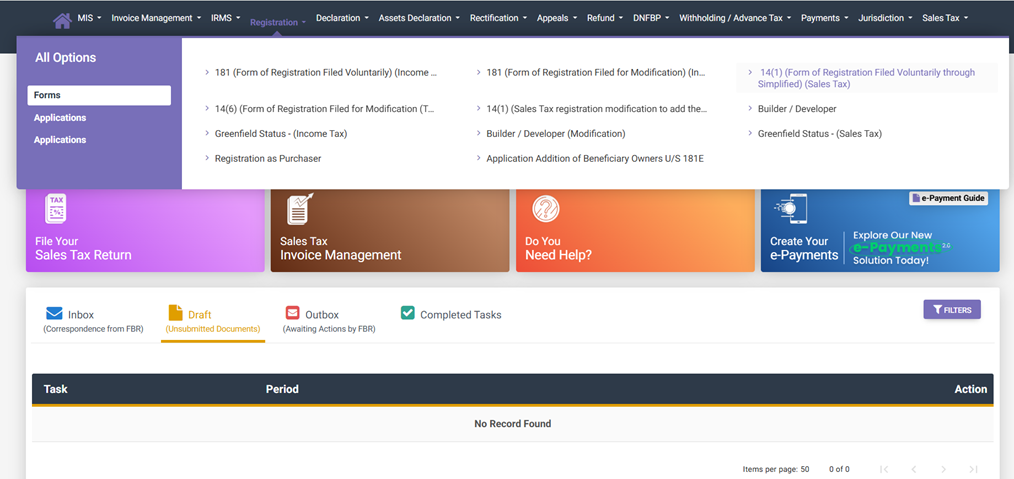
After submitting the registration form, get your biometric verification done from a NADRA e-Sahulat center near you. The concerned officer from the relevant RTO will review and approve your application if there is no objection.
Monthly
Sales Tax Return
After the
registration process is complete, every seller or service provider registered
for sales tax must file a monthly sales tax return.
In the sales
tax return, the taxpayer declares:
• Total sales made during the month
• Sales tax collected from customers
• Sales tax payable to the government
After
depositing the sales tax into the government treasury, the taxpayer must submit
the return under Section 26 of the Sales Tax Act, 1990.
For assistance
visit YouTube Channel https://www.youtube.com/@MALIKQAISER regarding sales tax
return filing, and Income Tax Services or get consultancy services from us by
contacting us on our WhatsApp number mentioned above in the header.